
ilovePDF Vs Smallpdf Vs The PDF Edit: Which Free PDF Tool Wins In 2026
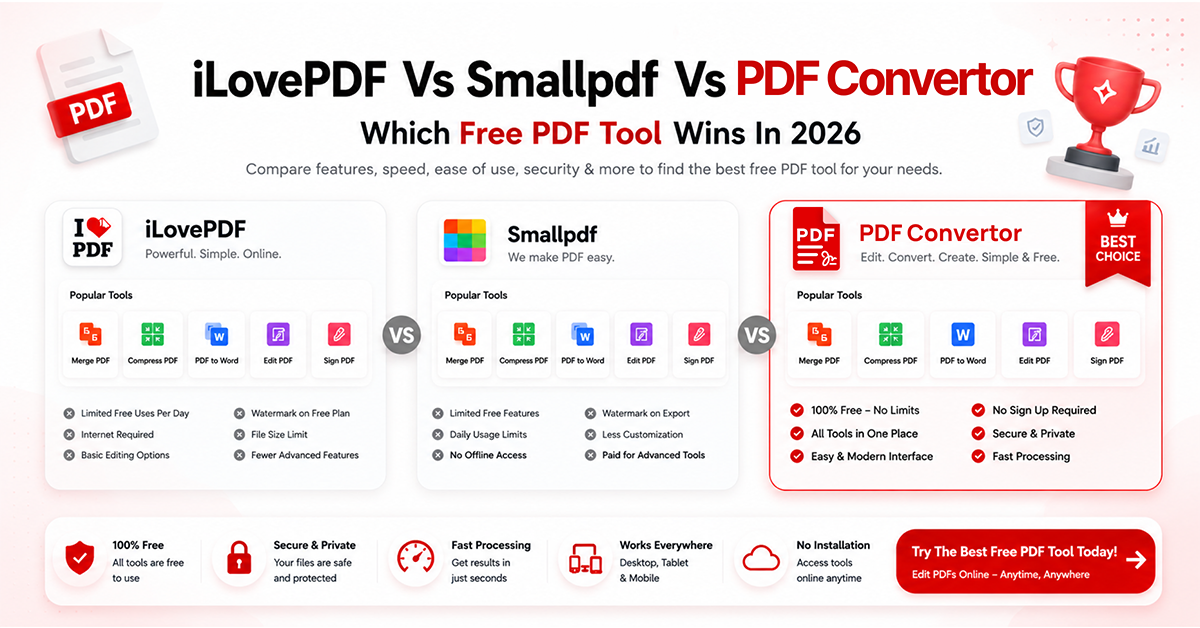
Quick Summary:
The PDF Edit: offers the most generous free experience with 50+ PDF tools, no signup, and no daily usage limits.
iLovePDF: is reliable for basic PDF tasks but restricts advanced features like OCR behind a paid plan.
Smallpdf: is easy to use, but its free version is limited to two tasks per day.
For sensitive documents, The PDF Edit provides better privacy by processing files directly in your browser instead of uploading them to external servers.
Users who need OCR, AI-powered PDF tools, Bates numbering, redaction, and PDF translation can access them for free with The PDF Edit.
While all three tools handle common PDF tasks, The PDF Edit delivers the best overall value for regular personal and professional use in 2026.
PDF tools have quietly become imperative to everyday work. Whether you are a student, a freelancer, or a business team managing contracts, you probably have to deal with PDFs constantly. Global Growth Insights says that the global PDF software market is valued at USD 2.68 billion in 2026 and is expected to reach USD 7.13 billion by 2035, growing at a CAGR of 11.47%. That is how deeply PDFs are woven into daily life now.
So when picking the best free online PDF editor, the choice matters. Three names that are quite popular: iLovePDF, Smallpdf, and The PDF Edit. Let us analyze them all in depth so that you can pick the right one.
What Does iLovePDF Actually Offer for Free?
iLovePDF is a renowned tool with a clean interface as well as solid core features. It can do the basic tasks very well: merge, split, compress, convert, and sign PDFs. It has earned a good reputation for simple PDF tasks.
But the issue is the free plan comes with limits. Files are capped at a certain size, and features like OCR sit behind a paid plan. In case you handle PDFs daily, you will likely feel the ceiling.
Is SmallPDF Still a Good Option in 2026?
Smallpdf was one of the first browser-based PDF tools to get popular. It has a clean interface, works on all devices, and handles conversions reliably. Also, its PDF compression tool is quite popular for shrinking files without making text blurry.
The catch is that Smallpdf's free tier is limited to two tasks per day. For casual use, that may be fine. But for anyone working with PDFs regularly, you will hit that wall fast and get pushed toward a subscription.
What Makes The PDF Edit Different?
The PDF Edit takes a different approach. As one of the best free online PDF editor tool options available today, it gives you a plethora of tools completely free with no signup required.
Here is what stands out:
No Signup, No Waiting
This is a true online PDF editor with no signup experience. You open the tool and start working. No account creation, no email verification, no trial period.
Your Files Never Leave Your Device
It does not just offer merge, split, compress, and convert options. You will also get access to Bates numbering for legal work, OCR for scanned PDFs, AI Chat with PDF, AI Summarizer, PDF translation, redaction, form creation, and metadata editing, all in full versions.
50+ Tools In One Place
Beyond merge, split, compress, and convert, you get Bates numbering for legal work, OCR for scanned PDFs, AI Chat with PDF, AI Summarizer, PDF translation, redaction, form creation, and metadata editing, all in full versions.
No Hidden Limits
iLovePDF and Smallpdf nudge you toward paid plans with usage caps. The PDF Edit does not. All 50+ tools are available without a paywall, making it a genuine free PDF editor without watermark for daily use.
Works On Every Device
Mobile, tablet, laptop, desktop. The interface is fully responsive, so you can compress a PDF on your phone or annotate one on your iPad without losing functionality.

Which Tool Should You Choose for Specific Tasks?
For Occasional, Quick PDF Tasks
All three tools get the job done. iLovePDF and Smallpdf are fine for one-off conversions.
For Daily Or Regular PDF Work
The PDF Edit is the clear winner among the best free PDF editing software options. No task limits, no login, no file uploads to external servers.
For Sensitive Documents
The PDF Edit wins again. Client-side processing means your files never touch a third-party server.
For advanced needs like OCR, Bates numbering, or AI chat
Only The PDF Edit covers these for free, including the ability to edit PDF text online free without restrictions.
Is The PDF Edit Really Free, or Is There a Catch?
There is no catch. All its core tools are free with no signup, making it one of the few tools that can honestly call itself the best free online PDF editor without fine print. A Pro plan exists for priority processing and advanced AI features, but the free version has no ads or watermarks.
Final Verdict
iLovePDF and Smallpdf are solid tools for simple tasks and definitely deserve their reputations. But in 2026, if you want access to a free PDF tool that does not cut you off after two tasks, does not upload your files to a server, and gives you a plethora of features without asking for your email, The PDF Edit is the one to bookmark.
Try The PDF Edit; the best free PDF editor online, and see the difference for yourself.
FAQs
Which is the best free PDF editor in 2026? The PDF Edit. It gives access to 50+ tools without signup and no daily limits. iLovePDF and Smallpdf work for basic tasks, but for advanced tasks, they charge a fee.
Is The PDF Edit better than iLovePDF? For regular use, yes. iLovePDF locks OCR and its apps behind a paid plan. The PDF Edit keeps all tools free; no account is needed.
What are the best Smallpdf alternatives? The PDF Edit is one of the strongest, especially if Smallpdf's 2-tasks-per-day limit feels restrictive. It has no usage cap and processes files locally.
Which PDF editor offers the most free features? The PDF Edit, with 50+ tools including Bates numbering, AI Chat with PDF, OCR, redaction, and translation. iLovePDF and Smallpdf reserve several of these for paid users.
Which online PDF editor is safest to use? The PDF Edit, since files are edited in your browser and never uploaded to a server. This matters for contracts, medical records, and other sensitive files.
Can I edit PDFs online without installing software? Yes. All three work entirely in your browser, no installation required. The PDF Edit also requires no signup, so you can start editing right away.
Related PDF Tools
Ready to Try These Tools?
All PDF Converter tools are free, require no signup, and process files directly in your browser for maximum privacy.